

Welcome
Accommodation for classroom testing provides an equal opportunity for students with verified disabilities to demonstrate mastery of the course objectives and take required course exams or evaluative assignments.
Accommodated Testing For completely online courses: We have asked your instructors to please be flexible and build extra time accommodations into their online quizzes, exams and finals. You will not need to schedule an appointment with our office.
On-campus proctoring is currently by appointment only: If you have a need for proctoring of an on-campus exam, please reach out to our office during normal business hours (8 a.m.-5 p.m. Monday-Thursday and Friday 8am- 12pm) and no less then five academic days before the exam is scheduled to be given, as to allow for the review of your request.
If you are a student or faculty member who needs support or has questions regarding testing accommodations through Canvas or Zoom, please email dsstestproctor@deanza.edu.
Here's How To Reach us
Fall Quarter Hours | September 24 - December 5
Testing Center (in-person, by appointment): 8 am - 5 pm Monday - Thursday, 8 am - 12 pm Friday
Email: dsstestproctor@fhda.edu
Phone: 408.864.8927
Steps To Arrange Testing Accommodations
How to request your Testing accommodations through Clockwork
Students:
After your DSS application and counseling intake appointment is complete, please use
Clockwork to request your approved accommodations.
Clockwork is a complete scheduling and data management system for our Disability Support Programs
and Services, streamlining via Myportal and simplifying processes for accommodation requests.
You will use ClockWork to send your accommodation letter to your instructor(s) who
will complete your request.
Accommodations are NOT automatically provided at De Anza College. Students must request their accommodations directly through Clockwork.
Please refer to the video and transcript below on how to request your accommodations.
Accommodations must be requested each and every quarter.
Accommodations are effective, once the student submits their letters of accommodation
(LOA) to their instructors. Accommodations are not retroactive.
How to Request Test Accommodations
How to Request Test Accommodation Video Transcript
- This video shows you how to request accommodations at Disability Support Services at De Anza College.
- First, you need to go to the De Anza College website at www.deanza.edu.
- At the top of the page, there is a login to my portal. It can look like a golden lock.
- Click on that.
Log in using your 8-digit student ID and password. - In the apps, you will need to find Clockwork.
- If you cannot find Clockwork on your homepage, then click on View All Cards, and search for Clockwork.
- You can favorite Clockwork by bookmarking it.
- Open Clockwork by clicking on Student and Faculty.
- Next, you will need to click on Clockwork De Anza Disability Support Programs and Services.
- The Clockwork menu will appear.
- Select the accommodation letter by clicking on it.
- This will take you to the initial page.
- Select Accommodations by clicking on it.
This will take you to the page that lists all of your current classes for the quarter. - In this instance, you will note, student already requested the accommodations and still has one pending.
- The first column shows the classes.
- The second column shows that you have not requested your accommodations.
- And the third column allows you to request the accommodation for the class.
- You want to choose the request button for any of the shown classes.
- Now, all of your classes will appear on the right-hand side, and the accommodations list will appear on the left-hand side.
- DSS recommends you select all classes, even when shown twice, one for the class, and one for the lab.
- Next, check only the accommodations you will need for this class.
- In this case, check extended time, and reduced distraction, as it is an in-person class.
- If this student was taking an online class, the only accommodation a student can request is extended time on exams.
- Online classes should be requested separately.
- Now that you have selected the classes and the accommodations.
- Click on My Accommodations are correct.
- Finally, you will need to scroll down to the bottom of the page and agree by checking the box for Clockwork to email your instructor the letter of accommodations.
- Once you click on Submit, the letters will be sent out to your instructor, to the DSS counselor, and to you.
- Clockwork will automatically take you to the previous screen and will show you in the second column that your letter of accommodation was sent.
- DSS highly recommends you request your accommodations on the first day of the quarter.
- Should this version of the video not be accessible to you, then please use the platform that works best for you.
Talk with your Instructor
Students please discuss your accommodation needs, for example 1.5x or 2x the assigned duration for an exam.
Once you submit your letter of accommodation, your instructor will receive an email notifying them of your authorized test accommodations. We have asked your instructors to please be flexible and build extra time accommodations into their virtual/online quizzes, exams and finals. You will not need to make an appointment through DSS.
Schedule an appointment for your On-Campus courses
Provide the following information for you on-campus course in your email to dsstestproctor@deanza.edu:
a. Your name and college student ID
b. Class name and CRN
c. List the day, and the time the scheduled test will take place and the in-class
duration.
*Please note that all tests need to be scheduled during class time unless prior arrangements
have been made with your instructor.
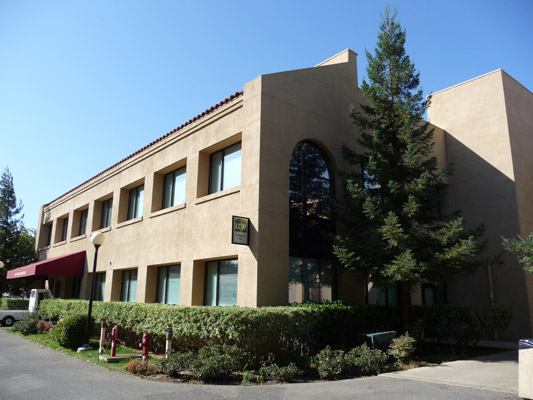
All appointments will take place in LCW 110, located behind the library.
APPLY FOR DSS TESTING GuidelinesTUTORIAL CENTER
Got Questions?
Feel free to give us a call or send us an email.
Michael Galindo
(408) 864-8927galindomichael@fhda.edu